I’ve always had a workflow. I’m a developer, of course I have. But a while back, the moment I started typing into a chat prompt, workflow gone. Out the window. I’d open up the chat interface, dump some context and what I wanted, smash enter, and hope for the best. The results were… fine? Underwhelming? Can you relate?
It took me a minute to get back to working like I work, just with AI as my partner this time.
At first I figured I needed better prompts. I started squirreling away the ones I liked in a note and plopping them in when I needed them. Then I found out about skills and started saving those. This was saving me typing, sure, but meanwhile I kept hearing about these wild AI wins out on the internet and I was over here going “…yeah, that’s not really what’s happening for me.”
Next move: see what everybody else was doing. I started installing other people’s skills. There was always SOMETHING I didn’t like, something I wanted to tweak or do differently. Then I tried out entire skill libraries that people had put together. Most of them felt very YOLO to me. I’d kick something off and then a bunch of stuff would just… happen… between my input and the output, and I didn’t love feeling that out of the loop. I wanted the speed gains, I wanted another perspective, but I still wanted to be the one driving and making choices.
The more I worked with these skills and libraries, the more I kept catching myself going “I want to do X here. This whole thing would work better if I could Y here and Z here.” What I wanted wasn’t a set of skills. It was a workflow. I wanted MY workflow, just souped up.
That’s when it clicked. I decided to back up and start thinking of this differently. I wanted to start framing this from the perspective of start to finish, considering the whole software development lifecycle, not only thinking of this tiny sliver of code I was looking at now. What was even more interesting was that now with MCPs that could pull in tickets and the ability to use the MCP to even write the tickets from requirements or a requirements doc, it made me think to back up even more. I went way back. I flashed back to my apprenticeship days, initially learning rspec, cucumber, and Capybara. Thinking about it from this wide perspective, I started cobbling together my souped up workflow and it felt like a return to home because my workflow had been restored but only way faster now.
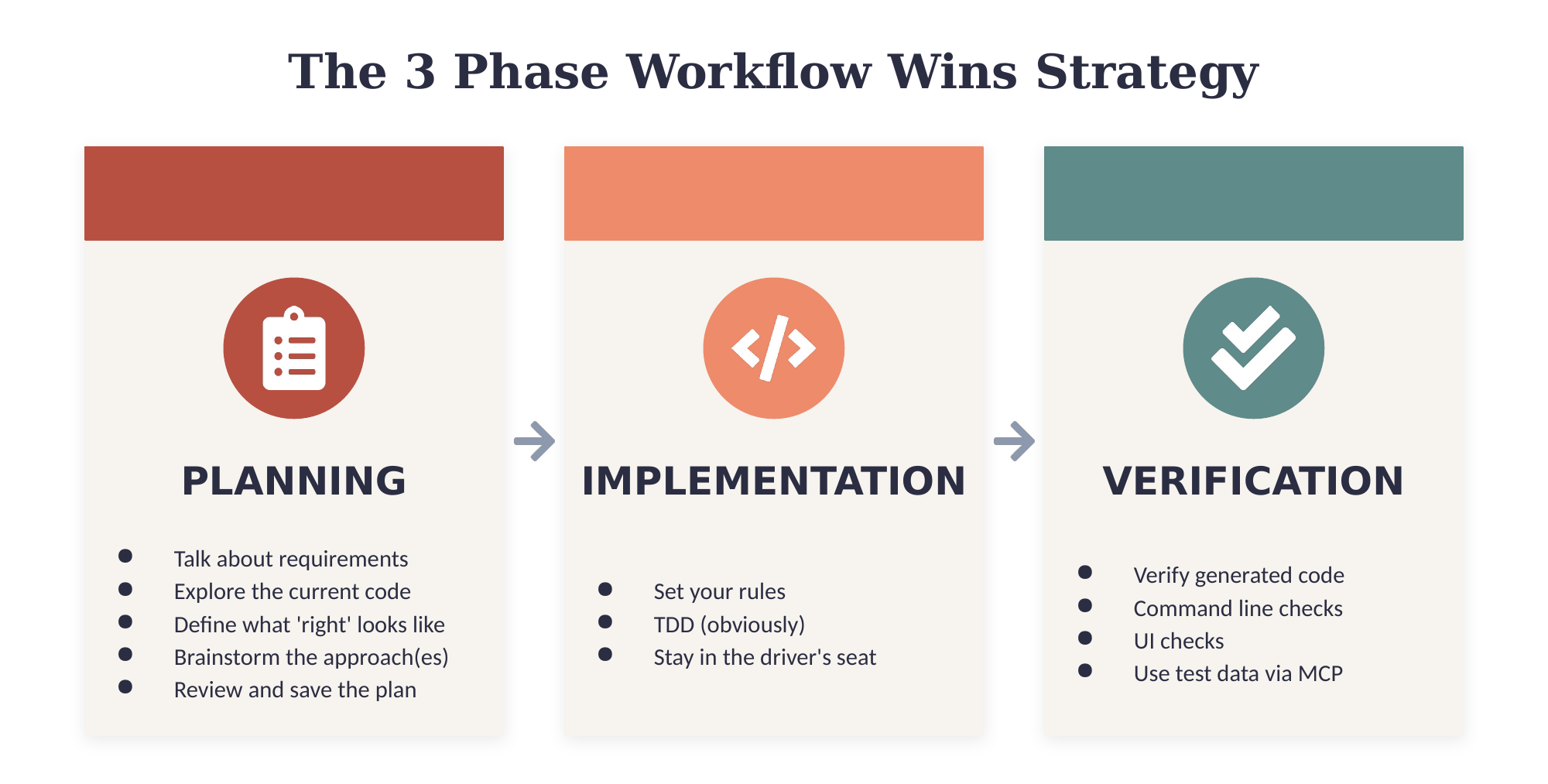
After tinkering, it was clear that I had developed a strategy that was working. In one of our sprint plannings, as we walked the board, a coworker asked me how I’m so productive. This is how. :) I iterated for a bit but once the dust settled, the way I’ve been thinking about it is that there are 3 over-arching phases, with their sub-phases where you can add your own flavor. Maybe you like 10 steps, maybe you like 7. Cool. They all fit inside these 3 over-arching phases, and for me, these 3 are non-negotiable: planning, implementation, and verification.
Planning
When planning, I like to:
- Talk about requirements. (Using an MCP to pull your story in is great for this if it’s well hydrated. If not, make sure you add detailed context.) Is there a PRD or a pitch document to start from? Are there designs?
- Explore the current state of the code where I’ll be working. AI can do a deep dive to surface possible problem spots or tradeoff decisions that you’ll need to make.
- Talk at a high level about how we’ll know when something is right. Do you have mockups as a target? (If so, I love to make BDD documents from this to help drive LiveView testing. More on that in another post coming soon.) What does qa look like?
- Brainstorm/plan/explore ideas for actually accomplishing the task and verifying it.
When the plan is done, I review it and save it. Extra helpful for working across multiple sessions. A checklist is a nice touch for the same reason. You can do all of this with however many skills you want, in whatever way you want, but I really do think you should do all the steps.
Side note: I started doing this for coding, but the 3 phases apply nicely to other kinds of work too. You just swap out details and sub-phases to fit the task at hand.
Implementation
Next, we implement. Set up your implementation rules however you like. Mine require TDD because, well, of course they do. :)
Verification
Depending on the feature, verification might be from the command line or in the UI. If you’re using an MCP that connects to your database, I highly suggest you have it add test data for you so you can verify against it and give you happy and error path scenarios to test. Nice, right? If I’m starting with mockups, I also like to have a visual verification/qa step that will loop on mismatch until we are pixel perfect. Before and after images help with UI bug fixes too.
Once I started playing with workflow, the gains showed up. The really interesting thing? The skills themselves mattered way less than the workflow. Swapping different versions of skills in and out at different phases gave me pretty similar results once my workflow was dialed in. Sure tweaking can contribute to extra boost but the framework does the heavy lifting. That’s why I’d suggest making your own skills, tailor made for how you actually like to work, or at least heading that direction after playing with someone else’s for a while. Maybe you want your plan in HTML so you can review it in the browser. Maybe you prefer markdown and to review it in your editor, maybe you just review it right in the window it was generated in. Maybe you don’t physically review it at all. That part really doesn’t matter, there is not one best way there except in the sense that it should be the best for YOU, which is obviously what you should be optimizing for.
As I’m always learning, I’m sure I’ll find more tweaks and tips and tricks to make this even better. But if you’ve been feeling like you haven’t been seeing the gains that everybody else seems to be having, give this workflow a go. You might be a lot closer than you think.